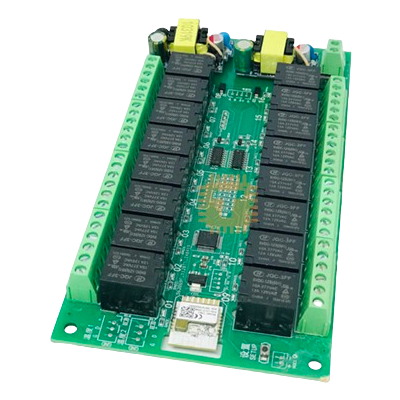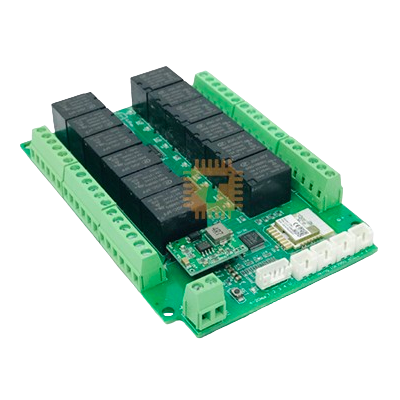
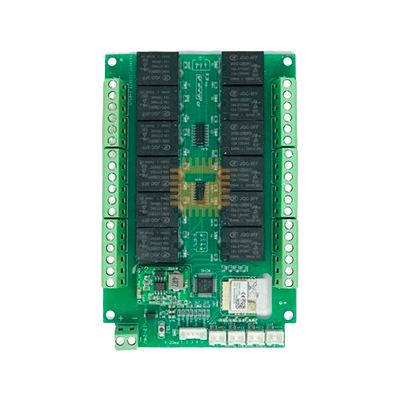
Tuya Multi-function 12-Channel WiFi Relay Module 7-12VDC
Price in Sri Lanka
Relays and SSRElectromechanical Modules
Tronic.lk

Rs 5,950
Out of stock
Updated 01 Nov 2026
Opening hours
Closed now
- Monday09:00 - 19:00
- Tuesday09:00 - 19:00
- Wednesday09:00 - 19:00
- Thursday09:00 - 19:00
- Friday09:00 - 19:00
- Saturday09:00 - 19:00
- SundayToday09:00 - 19:00
Search for it on
Description
The Tuya Multi-Function 12-Channel Wi-Fi Relay Module is a low-voltage intelligent switching board engineered for multi-circuit automation. Powered by 7V to 12V DC and integrated into the Tuya Smart and Smart Life ecosystems over 2.4 GHz Wi-Fi, it provides 12 independent relay outputs with isolated contacts. It supports advanced switching behaviours, including self-locking, microsecond-to-millisecond inching (jog), multi-channel interlocking, power-on memory, and schedule timers.
Specifications
- Number of Channels: 12 independent relay outputs
- Operating Supply Voltage: 7V to 12V DC
- Relay Contact Rating: 10A 250V AC / 10A 30V DC per channel
- Contact Type: Isolated dry contact (NO, COM, NC)
- Wireless Protocol: Wi-Fi 2.4 GHz (802.11 b/g/n)
- Mobile Platforms: Tuya Smart / Smart Life (iOS and Android)
- Voice Control Compatibility: Amazon Alexa, Google Assistant
- Working Modes: Self-locking, Inching (Jog), Interlocking, Fully Open, Fully Close, Schedule, Delay Timer
- Inching Time Range: 1 to 999,999,999 milliseconds (Independently configurable per channel)
- Hardware Controls: Manual push buttons for each channel, Set/Reset button, power and channel status LEDs
Terminal and Hardware Guide
- DC Power Input (+ / -): Screw terminals for 7V–12V DC main power supply.
- Relay Output Terminals (Channels 1 to 12):
- COM: Common terminal
- NO: Normally Open contact (Closes circuit when the relay is energized)
- NC: Normally Closed contact (Opens circuit when the relay is energized)
- Manual Channel Buttons: Tactile switches on the board for direct local toggling of individual relays without an active network connection.
- Set Button: Used to initiate Wi-Fi network pairing and execute factory resets.
Key Features
- 12 Isolated Dry-Contact Relays: Completely isolated contact pairs allow simultaneous control of diverse loads and voltages (AC mains, 5V logic signals, 12V automotive circuits, or 24V automation lines) across different channels.
- Microsecond-to-Millisecond Inching: Each channel features independent jog timing down to milliseconds, ideal for simulating momentary pushbutton presses for garage doors, gates, and computing equipment.
- Flexible Multi-Group Interlocking: Configure complex interlock arrays directly in the software to prevent mutually exclusive circuits (e.g., motor forward/reverse or multi-position valves) from powering simultaneously.
- Custom Power-On Behaviors: Allows users to specify each relay's boot status following power restoration: always ON, always OFF, restore last known state, or forced lock.
- Low-Voltage DC Operation: Runs directly from 7V–12V DC sources, making it suited for battery-backed systems, automotive setups, solar power banks, and standard DC industrial rails.
Common Applications
- Multi-Zone Low-Voltage Irrigation: Driving 12V or 24V solenoid valves on timed cycles for greenhouse and garden watering.
- Motor & Actuator Control: Managing linear actuators, motorized dampers, and shades safely using interlocked channels.
- Multi-Door Access Control: Providing momentary dry-contact trigger pulses for electronic strikes, magnetic door locks, and automatic gate operators.
- Automotive & Marine Systems: Controlling auxiliary lights, bilge pumps, fans, and onboard accessories in 12V vehicle systems.
Setup and App Pairing Guide
- Connect a stable 7V–12V DC power source to the input power terminals, observing correct polarity.
- Ensure your smartphone is connected to a 2.4 GHz Wi-Fi network with Bluetooth enabled.
- Open the Tuya Smart or Smart Life app, tap the + icon in the upper-right corner, and select Add Device.
- Power cycle the module if needed, and verify the network status LED is flashing rapidly.
- If the indicator does not flash, press and hold the Set button for approximately 10 seconds until the LED flashes rapidly to enter pairing mode.
- Confirm your 2.4 GHz Wi-Fi network credentials in the app to complete onboarding.
App Configuration Instructions
1. Channel Action Modes
- Self-Locking: Standard latching toggle. Press once to engage the relay; press again to release.
- Jog (Inching): Momentary activation. Engaging the relay causes it to automatically release after a configured time delay (default ~0.5s).
- Fully Open: Turns all 12 channels ON simultaneously.
- Fully Close: Turns all 12 channels OFF simultaneously.
- Delay / Timer: Schedules delayed activation or shutdown using countdowns or calendar timers.
2. Inching (Jog) Settings
- Select the channel number to display its current jog interval.
- Enter the desired pulse duration in milliseconds (valid range: 1 to 999,999,999 ms). For example, entering 500 produces a 0.5-second pulse.
- Enter 0 to disable the jog function and return that channel to standard latching mode.
3. Interlock Group Settings
- Channels 1 and 2 Interlocked: Enter 2 in the top parameter and 2 in the bottom parameter.
- Channels 1, 2, and 3 Interlocked: Enter 3 in the top parameter and 3 in the bottom parameter.
- Channels 1 through 10 Interlocked: Enter 10 in the top parameter and 10 in the bottom parameter.
- Dual 2-Channel Pairs (1-2 and 3-4): Enter 4 in the top parameter and 2 in the bottom parameter.
- Four 2-Channel Pairs (1-2, 3-4, 5-6, 7-8): Enter 8 in the top parameter and 2 in the bottom parameter.
- Dual 5-Channel Groups (1 to 5 and 6 to 10): Enter 10 in the top parameter and 5 in the bottom parameter.
- Disable All Interlocking: Enter 0 in both top and bottom parameters.
4. Power-On State Settings
- Select the target channel number and configure its power-restoration response code:
- Enter 1: Channel automatically switches ON upon boot.
- Enter 2: Channel defaults to OFF upon boot.
- Enter 3: Channel restores its previous state prior to power loss.
- Enter 4: Channel is forced ON and app control is locked out.
5. Factory Reset Procedure
- Press and hold the Set button for 10 seconds. Release the button when the network LED flashes rapidly. All pairing data, interlock settings, and custom timers will be cleared.
Frequently asked questions
What is the price of Tuya Multi-function 12-Channel WiFi Relay Module 7-12VDC in Sri Lanka?▾
The current price of Tuya Multi-function 12-Channel WiFi Relay Module 7-12VDC in Sri Lanka is Rs 5,950 at Tronic.lk.
Is Tuya Multi-function 12-Channel WiFi Relay Module 7-12VDC available in Sri Lanka?▾
Tuya Multi-function 12-Channel WiFi Relay Module 7-12VDC is currently out of stock at Tronic.lk in Sri Lanka.
Where can I buy Tuya Multi-function 12-Channel WiFi Relay Module 7-12VDC in Sri Lanka?▾
You can buy Tuya Multi-function 12-Channel WiFi Relay Module 7-12VDC in Sri Lanka at Tronic.lk. Visit 37left.lk to compare prices across multiple shops and find the best deal.
Loading...