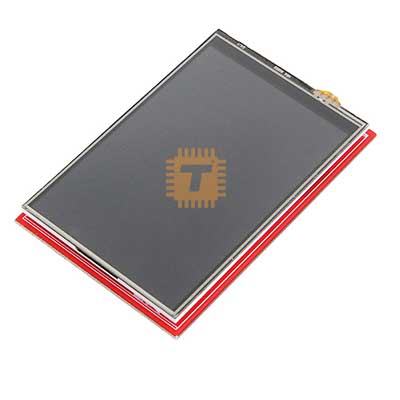
W5100 Ethernet Shield for Arduino
Price in Sri Lanka
EthernetCommunication ModulesArduino Compatibles
Tronic.lk

Rs 2,200
In stock
Updated 01 Nov 2026
Opening hours
Closed now
- Monday09:00 - 19:00
- Tuesday09:00 - 19:00
- Wednesday09:00 - 19:00
- Thursday09:00 - 19:00
- Friday09:00 - 19:00
- Saturday09:00 - 19:00
- SundayToday09:00 - 19:00
Search for it on
Description
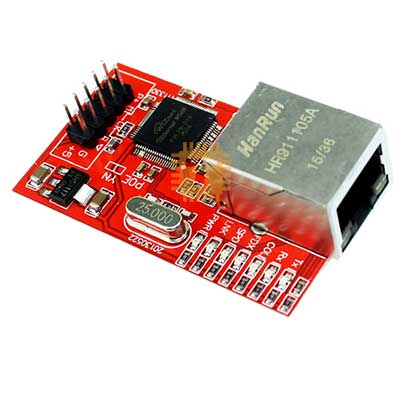
This the very latest Ethernet Shield for Arduino and now includes a microSD card socket and is now "Power Over Ethernet" ready!
The Arduino Ethernet Shield allows an Arduino board to connect to the internet. It is based on the Wiznet W5100 ethernet chip (datasheet). The Wiznet W5100 provides a network (IP) stack capable of both TCP and UDP. It supports up to four simultaneous socket connections. Use the Ethernet library to write sketches which connect to the internet using the shield. The Ethernet shield connects to an Arduino board using long wire-wrap headers which extend through the shield. This keeps the pin layout intact and allows another shield to be stacked on top.
The latest revision of the shield adds a micro-SD card slot, which can be used to store files for serving over the network. It is compatible with the Arduino Duemilanove and Mega (using the Ethernet library coming in Arduino 0019). An SD card library is not yet included in the standard Arduino distribution, but the sdfatlib by Bill Greiman works well. See this tutorial from Adafruit Industries for instructions.
The latest revision of the shield also includes a reset controller, to ensure that the W5100 Ethernet module is properly reset on power-up. Previous revisions of the shield were not compatible with the Mega and need to be manually reset after power-up. The original revision of the shield contained a full-size SD card slot; this is not supported.
Arduino communicates with both the W5100 and SD card using the SPI bus (through the ICSP header). This is on digital pins 11, 12, and 13 on the Duemilanove and pins 50, 51, and 52 on the Mega. On both boards, pin 10 is used to select the W5100 and pin 4 for the SD card. These pins cannot be used for general i/o. On the Mega, the hardware SS pin, 53, is not used to select either the W5100 or the SD card, but it must be kept as an output or the SPI interface won't work.
Note that because the W5100 and SD card share the SPI bus, only one can be active at a time. If you are using both peripherals in your program, this should be taken care of by the corresponding libraries. If you're not using one of the peripherals in your program, however, you'll need to explicitly deselect it. To do this with the SD card, set pin 4 as an output and write a high to it. For the W5100, set digital pin 10 as a high output.
Specifications:
- The shield provides a standard RJ45 Ethernet jack.
- The reset button on the shield resets both the W5100 and the Arduino board.
- The shield contains a number of informational LEDs:
- PWR: indicates that the board and shield are powered
- LINK: indicates the presence of a network link and flashes when the shield transmits or receives data
- FULLD: indicates that the network connection is full duplex
- 100M: indicates the presence of a 100 Mb/s network connection (as opposed to 10 Mb/s)
- RX: flashes when the shield receives data
- TX: flashes when the shield sends data
- COLL: flashes when network collisions are detected
The Ethernet shield connects to an Arduino board using long wire-wrap headers which extend through the shield. This keeps the pin layout intact and allows another shield to be stacked on top.
Features:
- Operating voltage 5V (supplied from the Arduino Board)
- Ethernet Controller: W5100 with internal 16K buffer
- Connection speed: 10/100Mb
- Connection with Arduino on SPI port
- The Shield contains a number of informational LEDs
- PWR: indicates that the board and shield are powered
- LINK: indicates the presence of a network link and flashes when the shield transmits or receives data
- FULLD: indicates that the network connection is full duplex
- 100M: indicates the presence of a 100 Mb/s network connection (as opposed to 10 Mb/s)
- RX: flashes when the shield receives data
- TX: flashes when the shield sends data
- TX: flashes when the shield sends data
- COLL: flashes when network collisions are detected
Frequently asked questions
What is the price of W5100 Ethernet Shield for Arduino in Sri Lanka?▾
The current price of W5100 Ethernet Shield for Arduino in Sri Lanka is Rs 2,200 at Tronic.lk.
Is W5100 Ethernet Shield for Arduino available in Sri Lanka?▾
Yes, W5100 Ethernet Shield for Arduino is currently in stock at Tronic.lk in Sri Lanka.
Where can I buy W5100 Ethernet Shield for Arduino in Sri Lanka?▾
You can buy W5100 Ethernet Shield for Arduino in Sri Lanka at Tronic.lk. Visit 37left.lk to compare prices across multiple shops and find the best deal.
Loading...