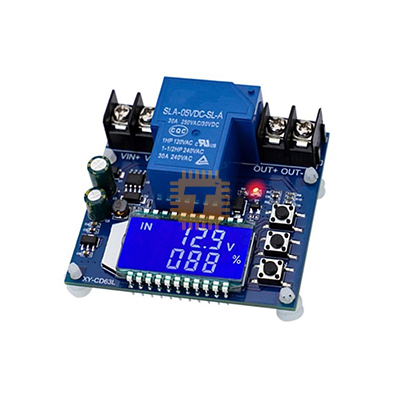
XY-CD63L 30A Battery Charging Module with Protection
Price in Sri Lanka
Battery Chargers & Power BanksBatteries and Chargers
Tronic.lk

Rs 2,700
In stock
Updated 01 Nov 2026
Opening hours
Closed now
- Monday09:00 - 19:00
- Tuesday09:00 - 19:00
- Wednesday09:00 - 19:00
- Thursday09:00 - 19:00
- Friday09:00 - 19:00
- Saturday09:00 - 19:00
- SundayToday09:00 - 19:00
Search for it on
Description
Specifications:
- Voltage: 6-60V
- Current: 30A Max
Charging Mode IN:
- By setting the upper limit voltage UP and lower limit voltage dn; when the battery voltage ≤ lower limit voltage dn
- The relay is turned on, the charger starts to charge the battery; when the battery voltage ≥ the upper limit voltage UP
- The relay is disconnected to complete an automatic charging; the relay is turned on and IN flashes, indicating positive is charging
Discharge Mode OUT:
- By setting the upper limit voltage UP and lower limit voltage dn; when the battery voltage ≥ the upper limit voltage UP
- The relay is turned on and starts to discharge; when the battery voltage is less than or equal to the lower limit voltage dn, the relay is disconnected
- Complete an automatic discharge function; the relay is turned on, and the OUT flashes, indicating that it is being discharged
Note:
- This product is a simple voltage controller, which is turned on and off through a relay.
- When the output is cut off, it only acts as a switch, and cannot be transformed.
Function Description:
- Calculation of voltage percentage: battery voltage / (upper limit voltage – lower limit voltage).
- Button function:
- UP button: short press to switch display % and time, long press for 5 seconds to switch mode, charging mode: IN, discharge mode: OUT
- SET button: short press to view the currently set parameters; long press the SET button to enter parameter settings interface, set UP: upper voltage limit, dn: lower voltage limit, OP: conduction time, dOP: Delayed on time (0-999 seconds), with FOP in discharge mode: forced on time (0-10 Second)
- DOWN button: short press to turn off/on the relay enable (emergency stop function)
- The crystal display is OFF, and the relay is disconnected
- Long press the DOWN button to set the status of the LCD backlight L-P: OFF backlight is always on, ON
- The backlight will automatically turn off after 5–10 minutes; any key will wake up after turning off
Parameter Setting:
- Press and hold the SET button to enter the parameter setting interface
- After entering the parameter setting interface, short press the SET key to switch the set parameters
- After selecting the parameter, you can set it through the UP/DOWN key, support short press
- To set other parameters, repeat steps b) and c)
- After all parameter settings are completed, long press the SET button to exit and save
Charge/discharge time control function:
- When the time parameter OP is set to be non-zero, the charge/discharge time control is started; when the relay conducts When the first charge/discharge is turned on, the timing starts; when the timing is completed, the relay is automatically disconnected to complete
- The second charge/discharge process; if the timing is completed, in the charge mode, the detection voltage < lower> the upper limit voltage UP, the charging time control function is automatically turned off, and flashes
- The flashing display H:ER reminds the user that the time parameter setting is unreasonable; press any key to stop flashing
- When the charge/discharge time control is not turned on, the product will record a complete time, when enter the time display interface, flashing display charging time; then exit the time display interface or the next time
- Cleared when charging is turned on (relay is turned on)
Automatic parameter detection:
- After setting the parameters and exiting, if the lower voltage limit dn ≥ the upper limit voltage up
- The system will flash “ERR” as a reminder
- Delay turn-on function dOP (0~999 seconds)
- The interval time between completing a charge/discharge and turning it on again
- Discharge conduction forced start time FOP (0~10S)
- After the relay conduction conditions are met, the relay is forced to be turned on (0~10S)
- Detect the battery voltage; this function is mainly for the discharge function
- At the moment of conduction, it will be pulled down to the lower limit voltage instantly, and the relay will be disconnected due to false triggering.
Frequently asked questions
What is the price of XY-CD63L 30A Battery Charging Module with Protection in Sri Lanka?▾
The current price of XY-CD63L 30A Battery Charging Module with Protection in Sri Lanka is Rs 2,700 at Tronic.lk.
Is XY-CD63L 30A Battery Charging Module with Protection available in Sri Lanka?▾
Yes, XY-CD63L 30A Battery Charging Module with Protection is currently in stock at Tronic.lk in Sri Lanka.
Where can I buy XY-CD63L 30A Battery Charging Module with Protection in Sri Lanka?▾
You can buy XY-CD63L 30A Battery Charging Module with Protection in Sri Lanka at Tronic.lk. Visit 37left.lk to compare prices across multiple shops and find the best deal.
Loading...